
AI MUSIC TRANSCRIPTION
Audio to Sheet Music Converter
Turn an MP3, a WAV file or a melody you hum into readable sheet music. Choose melody or piano notation, check the detected key and tempo, then print it or export MIDI and MusicXML for MuseScore, Finale, Sibelius or your DAW.
- MP3, WAV, M4A or a live recording
- Melody or two-staff piano notation
- Free print · MIDI & MusicXML export
1. Upload or record audio
Files up to 50 MB. Each conversion covers up to 5 minutes; longer files use the first 5 minutes.
2. Choose the notation
Add an audio file or record a melody to start.
Viewing and printing the sheet is free. MIDI or MusicXML downloads use 1 credit each. Works best on one melody or solo piano. Full band mixes give rough results.
Your sheet music
Your sheet music will appear here.
Best results come from one clear melody (voice, humming, flute, violin) or solo piano.
Convert Audio to Sheet Music in Three Steps
- 01
Add your audio
Drop in an MP3, WAV, M4A, OGG or FLAC file, or press record and hum or sing the melody straight into your microphone.
- 02
Pick melody or piano
Melody writes one clean line on a single staff, ideal for voice and solo instruments. Piano keeps chords and splits them across the treble and bass clefs.
- 03
Print or export
Check the detected key and tempo, print the score for free, or download MIDI and MusicXML to keep editing in notation software or a DAW.
Real Output, Unedited
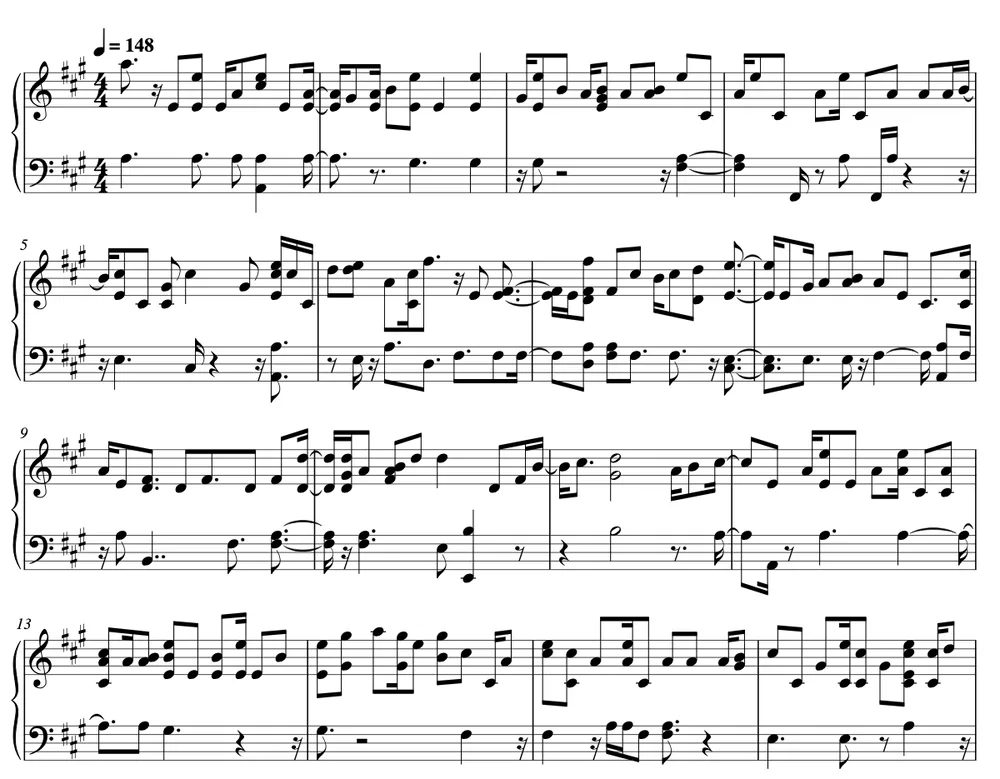
This is what the converter produced from a solo piano recording in Piano mode, with no manual fixes: key signature, time signature, tempo mark, and chords split across treble and bass staves.
Source recording (2:21)
Shown: the first four systems of page one. The full transcription runs to four pages and can be printed or exported as MIDI and MusicXML.
Melody or Piano Notation?
The same recording can be written two ways. Choosing the right one is the biggest single factor in how readable your sheet music is.
Melody mode
For singing, humming, whistling, flute, violin, sax, trumpet or any instrument that plays one note at a time. Vibrato and overtones are cleaned up so each held note appears once, and the line lands on a single staff in treble or bass clef depending on its range.
Piano mode
For solo piano, keyboard or chord-based parts. Notes from middle C up go on the treble staff, lower notes on the bass staff, and notes that start together are written as chords, like a standard piano score.
What Converts Well (and What Doesn't)
Automatic music transcription is impressive, but it is not magic. Knowing where it shines saves you time.
Great results
- A cappella singing, humming or whistling
- Solo flute, violin, sax, clarinet or trumpet
- Solo piano or keyboard recordings
- Clean recordings with little reverb or background noise
- Melodies created with our voice to instrument tool
Rough results
- Full songs with drums, bass and vocals mixed together
- Heavy distortion, reverb or crowd noise
- Very fast runs, ornaments and free rubato
- Drums and other unpitched percussion
Have a full song? Isolate the part you want first with the AI vocal remover or stem splitter, then transcribe the clean vocal or instrument track.
Sheet Music, MIDI and MusicXML: What You Get
Printable score
A clean engraved score with key signature, time signature, tempo mark and bar numbers. Print it straight from your browser, one page at a time.
MIDI file
Every detected note with its timing and velocity at the detected tempo. Drag it into GarageBand, Logic Pro, Ableton Live, FL Studio or Cubase and play it with any virtual instrument.
MusicXML file
The editable score. Open it in MuseScore, Finale, Sibelius, Dorico or Noteflight to fix a note, add lyrics, transpose for your instrument or print parts.
How AI Audio to Sheet Music Transcription Works
Converting audio to sheet music used to mean hours of listening, pausing and writing down one note at a time. Music transcription software now does the heavy lifting: it listens to the recording, works out which pitches sound at each moment, and writes them as notation you can read and play.
Our converter starts with a neural network trained to detect musical notes in audio. It analyses the recording in short slices and estimates where each note starts, how long it lasts and how loudly it is played. For a sung or hummed melody it also cleans up what makes voices hard to transcribe: vibrato that wobbles around the pitch, breathy note starts, and overtones that can fool simpler pitch detectors into reporting extra notes.
Raw note events are not sheet music yet. The next step estimates the tempo by testing which beat grid the note onsets fit best, then quantizes every note to straight eighth and sixteenth notes, so the rhythm reads cleanly instead of turning into a tangle of tiny rests and triplets. The key is detected from the pitches you actually played, which gives the score the right key signature and sensible sharps or flats.
Finally the music is engraved: bar lines, ties across bar lines, clefs, a tempo mark and page layout. You see the full score in your browser, can print it, and can export MIDI and MusicXML. Because MusicXML is editable, any note the AI got wrong can be fixed in a minute in free notation software such as MuseScore.
MP3 to sheet music works exactly like WAV or M4A: the file is decoded to audio first, so the format matters far less than what is in the recording. A clean solo performance transcribes much better than a dense mix, which is why the converter asks whether you want a single melody line or a piano-style score.
Only have a tune in your head? Hum it into the recorder. It is the quickest way to write down a melody idea before it slips away, and if you would rather hear it played, our voice to instrument converter turns the same hum into piano, violin or saxophone audio. Working in a DAW instead of notation? The audio to MIDI converter gives you the same notes as a MIDI file.
Who Uses an Audio to Sheet Music Converter
Songwriters
Capture a melody from a voice memo and hand a lead sheet to your band, singer or producer.
Music students
Transcribe a solo you are learning, then compare the notation with what you hear to train your ear.
Teachers and choir leaders
Turn a recorded part into printable sheet music for rehearsal in minutes instead of an evening.
Producers
Pull a MIDI melody out of an audio sketch and replay it with any synth or sample library.
Audio to Sheet Music FAQ
Is the audio to sheet music converter free?
Transcribing, viewing and printing the sheet music is free once you sign in. Downloading the MIDI or MusicXML file uses 1 credit each, and new accounts get free starter credits, so you can try the full workflow before buying anything.
Can I convert an MP3 to sheet music?
Yes. Upload MP3, WAV, M4A, OGG, FLAC or WebM files up to 50 MB. Each conversion covers up to five minutes of audio; for longer recordings the first five minutes are transcribed.
How accurate is AI music transcription?
For one clear melody, such as singing, humming or a single instrument, most notes and rhythms come out right, and the key and tempo are detected automatically. Solo piano works well too. Full band mixes are hard for any transcription software, so expect a rough sketch there and use the MusicXML file to correct it.
Can I turn humming into sheet music?
Yes. Press record, hum or sing the melody, and choose Melody mode. Hum each note clearly on a syllable like “da” or “doo” and keep a steady tempo for the cleanest result.
Can I convert a whole song to sheet music?
You can, but songs with drums, bass and vocals together produce cluttered notation. Separate the part you want first with the vocal remover or stem splitter, then transcribe the isolated vocal or instrument.
Can I paste a YouTube link?
Links are not supported. Upload an audio file you have the right to use, or record the melody yourself.
Which programs open the MIDI and MusicXML files?
MIDI opens in every DAW, including GarageBand, Logic Pro, Ableton Live, FL Studio and Cubase. MusicXML opens in MuseScore, Finale, Sibelius, Dorico and Noteflight, where you can edit notes, add lyrics and print parts.
Does it write guitar tabs or chords?
It writes standard notation, not guitar tablature. Piano mode keeps chords and writes them on a grand staff, which also works for many guitar and keyboard recordings.
Why is the tempo or rhythm wrong?
Tempo is estimated from where the notes start. Rubato, a free intro or a heavily syncopated part can lead it to double or half time. Record with a steady beat, or open the MusicXML file and adjust the tempo in your notation software.
More Music Tools
Audio to MIDI Converter
Convert recordings into MIDI notes for your DAW.
Voice to Instrument
Hum a melody and hear it played on real instruments.
AI Vocal Remover
Split vocals from the backing track before transcribing.
AI Stem Splitter
Separate drums, bass, vocals and other instruments.
MIDI Editor
Edit notes, timing and velocity in your browser.
Key & BPM Finder
Find the key and tempo of any song in seconds.
Write Down Your Next Melody
Upload a recording or hum an idea and get sheet music you can print, edit and share.
Convert audio to sheet music